> ## Documentation Index
> Fetch the complete documentation index at: https://docs.raycaster.ai/llms.txt
> Use this file to discover all available pages before exploring further.
# Answer - AI-Powered Questionnaire Responses
> Upload questionnaires and generate comprehensive answers using your organization's knowledge base
## Overview
The Answer feature transforms how your organization responds to RFIs (Request for Information), RFPs (Request for Proposals), and other complex questionnaires. Instead of manually researching and writing responses, Raycaster's AI uses your organization's knowledge base to generate comprehensive, accurate answers automatically.
 ## How Answer Works
Answer leverages your organization's accumulated knowledge — including previous proposals, technical documents, research papers, and internal documentation — to create intelligent, contextual responses to questionnaire items.
**The process:**
1. Upload your questionnaire (PDF or DOCX format)
2. Raycaster classifies the document type and extracts questions
3. AI agents analyze each question and generate answers from your knowledge base
4. Review, refine, and export your responses
## Uploading Questionnaires
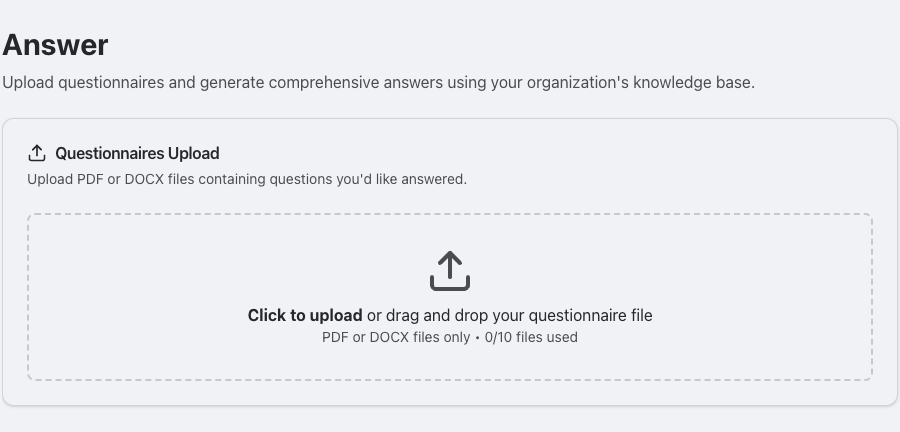
Navigate to the Answer section in your Raycaster workspace.
Click "Click to upload" or drag and drop your questionnaire file.
**Supported formats:**
* PDF files (including interactive forms)
* DOCX files (Microsoft Word documents)
Files are limited to 2/10 files at a time for optimal processing performance.
Raycaster automatically:
* **Classifies** the document type (RFI, RFP, due diligence questionnaire, etc.)
* **Extracts** individual questions from the document
* **Organizes** questions into logical sections
* **Processes** each question through multiple AI agents
## Multi-Agent Processing
Behind the scenes, Answer uses a sophisticated multi-agent system to generate high-quality responses:
1. **Document Classifier** — Identifies the document type (RFI, RFP, compliance form, etc.) to tailor the processing approach
2. **Questionnaire Orchestrator** — Plans the work and coordinates multiple AI agents, assigning questions based on topic and complexity
3. **Answer SubAgents** — Specialized "worker" agents that research and write answers for assigned questions using your organization's files as context
4. **File Attachment Responder** — Identifies questions that request file attachments and attempts to match them with relevant organization files
This parallel processing approach allows Raycaster to handle questionnaires with dozens or hundreds of questions efficiently.
## Question Types
Answer supports multiple question formats:
| Type | Description | Example |
| ------------------- | ----------------------------------------- | ---------------------------------------------- |
| **Short text** | Brief, factual responses | "What is your company's legal name?" |
| **Long text** | Detailed explanations and descriptions | "Describe your manufacturing capabilities." |
| **Single select** | Choose one option from a list | "Is your facility GMP certified? Yes / No" |
| **Multi-select** | Choose multiple options | "Select all applicable regulatory frameworks." |
| **File attachment** | Questions requesting supporting documents | "Please attach your latest audit report." |
Each question in the generated questionnaire includes:
* The extracted question text
* The AI-generated answer
* A completion status indicator
* An explanation of how the answer was derived
* References to source documents used
## Reviewing and Refining Answers
### Inline Editing
Click on any answer to edit it directly. You can modify the AI-generated response, add details, or rewrite it entirely.
### Answer Refinement
For more nuanced refinement, use the chat-based refinement feature:
Click on the question you want to refine.
Click the **Refine** button to open a chat interface for that specific question.
Give the AI additional context, corrections, or direction. You can also upload additional files as reference material.
The AI regenerates the answer incorporating your feedback. Accept the new version or continue refining.
### Clarify Feature
When multiple questions remain unanswered or incomplete, the Clarify feature lets you address them efficiently in batch:
Click the **Clarify** button to see all incomplete questions at once.
The AI generates targeted clarifying questions about the gaps. Respond with text explanations or upload relevant files.
Based on your responses, the AI proposes answers for multiple questions simultaneously.
Review each proposed answer and accept, modify, or reject it.
The Clarify feature is particularly useful when a questionnaire has many questions about the same topic. A single clarification response can resolve multiple related questions.
## PDF Form Filling
For PDFs with interactive form fields, Answer can fill in the form directly:
* The system detects interactive PDF forms automatically
* AI-generated answers are mapped to the corresponding form fields
* The original PDF layout and formatting are preserved
* Download the filled PDF for submission
This is especially useful for standardized forms where maintaining the exact document format is required.
## Document Generation
Once your questionnaire is complete, you can generate a formatted response document:
* Export answers as a structured document
* Maintain the original question-and-answer format
* Include references and supporting information
* Ready for review and submission
## Example Use Cases
**Challenge:** You receive an RFI from a potential partner asking detailed questions about your therapeutic development capabilities.
**Solution:** Upload the RFI document and let Answer generate responses based on your organization's:
* Previous regulatory submissions
* Technical capabilities documentation
* Research publications
* Development timelines and processes
**Challenge:** Responding to a complex RFP with dozens of technical and business questions.
**Solution:** Answer generates initial responses by referencing:
* Past successful proposals
* Company capability statements
* Technical specifications
* Team qualifications and experience
**Challenge:** Investor or partner due diligence questionnaires requiring detailed information about operations, compliance, and capabilities.
**Solution:** Generate comprehensive responses using:
* Financial documentation
* Compliance records
* Operational procedures
* Strategic planning documents
**Challenge:** Repetitive compliance questionnaires with overlapping questions across different regulators.
**Solution:** Answer remembers previous responses and can quickly generate consistent answers across multiple forms, reducing the risk of contradictory submissions.
## Best Practices
The quality of generated answers depends directly on the breadth and depth of your organization's knowledge base. Upload previous proposals, technical documents, regulatory filings, and capability statements to give the AI the best source material.
AI-generated answers are a strong starting point, but always review them for accuracy, tone, and completeness before submitting to external parties.
Instead of refining questions one at a time, use the Clarify feature to address multiple gaps with a single context input. This is faster and produces more consistent answers.
When questions ask for supporting documents, Answer will attempt to identify relevant files from your organization's knowledge base. Keep your files well-organized and named descriptively for better matches.
## How Answer Works
Answer leverages your organization's accumulated knowledge — including previous proposals, technical documents, research papers, and internal documentation — to create intelligent, contextual responses to questionnaire items.
**The process:**
1. Upload your questionnaire (PDF or DOCX format)
2. Raycaster classifies the document type and extracts questions
3. AI agents analyze each question and generate answers from your knowledge base
4. Review, refine, and export your responses
## Uploading Questionnaires
Navigate to the Answer section in your Raycaster workspace.
Click "Click to upload" or drag and drop your questionnaire file.
**Supported formats:**
* PDF files (including interactive forms)
* DOCX files (Microsoft Word documents)
Files are limited to 2/10 files at a time for optimal processing performance.
Raycaster automatically:
* **Classifies** the document type (RFI, RFP, due diligence questionnaire, etc.)
* **Extracts** individual questions from the document
* **Organizes** questions into logical sections
* **Processes** each question through multiple AI agents
## Multi-Agent Processing
Behind the scenes, Answer uses a sophisticated multi-agent system to generate high-quality responses:
1. **Document Classifier** — Identifies the document type (RFI, RFP, compliance form, etc.) to tailor the processing approach
2. **Questionnaire Orchestrator** — Plans the work and coordinates multiple AI agents, assigning questions based on topic and complexity
3. **Answer SubAgents** — Specialized "worker" agents that research and write answers for assigned questions using your organization's files as context
4. **File Attachment Responder** — Identifies questions that request file attachments and attempts to match them with relevant organization files
This parallel processing approach allows Raycaster to handle questionnaires with dozens or hundreds of questions efficiently.
## Question Types
Answer supports multiple question formats:
| Type | Description | Example |
| ------------------- | ----------------------------------------- | ---------------------------------------------- |
| **Short text** | Brief, factual responses | "What is your company's legal name?" |
| **Long text** | Detailed explanations and descriptions | "Describe your manufacturing capabilities." |
| **Single select** | Choose one option from a list | "Is your facility GMP certified? Yes / No" |
| **Multi-select** | Choose multiple options | "Select all applicable regulatory frameworks." |
| **File attachment** | Questions requesting supporting documents | "Please attach your latest audit report." |
Each question in the generated questionnaire includes:
* The extracted question text
* The AI-generated answer
* A completion status indicator
* An explanation of how the answer was derived
* References to source documents used
## Reviewing and Refining Answers
### Inline Editing
Click on any answer to edit it directly. You can modify the AI-generated response, add details, or rewrite it entirely.
### Answer Refinement
For more nuanced refinement, use the chat-based refinement feature:
Click on the question you want to refine.
Click the **Refine** button to open a chat interface for that specific question.
Give the AI additional context, corrections, or direction. You can also upload additional files as reference material.
The AI regenerates the answer incorporating your feedback. Accept the new version or continue refining.
### Clarify Feature
When multiple questions remain unanswered or incomplete, the Clarify feature lets you address them efficiently in batch:
Click the **Clarify** button to see all incomplete questions at once.
The AI generates targeted clarifying questions about the gaps. Respond with text explanations or upload relevant files.
Based on your responses, the AI proposes answers for multiple questions simultaneously.
Review each proposed answer and accept, modify, or reject it.
The Clarify feature is particularly useful when a questionnaire has many questions about the same topic. A single clarification response can resolve multiple related questions.
## PDF Form Filling
For PDFs with interactive form fields, Answer can fill in the form directly:
* The system detects interactive PDF forms automatically
* AI-generated answers are mapped to the corresponding form fields
* The original PDF layout and formatting are preserved
* Download the filled PDF for submission
This is especially useful for standardized forms where maintaining the exact document format is required.
## Document Generation
Once your questionnaire is complete, you can generate a formatted response document:
* Export answers as a structured document
* Maintain the original question-and-answer format
* Include references and supporting information
* Ready for review and submission
## Example Use Cases
**Challenge:** You receive an RFI from a potential partner asking detailed questions about your therapeutic development capabilities.
**Solution:** Upload the RFI document and let Answer generate responses based on your organization's:
* Previous regulatory submissions
* Technical capabilities documentation
* Research publications
* Development timelines and processes
**Challenge:** Responding to a complex RFP with dozens of technical and business questions.
**Solution:** Answer generates initial responses by referencing:
* Past successful proposals
* Company capability statements
* Technical specifications
* Team qualifications and experience
**Challenge:** Investor or partner due diligence questionnaires requiring detailed information about operations, compliance, and capabilities.
**Solution:** Generate comprehensive responses using:
* Financial documentation
* Compliance records
* Operational procedures
* Strategic planning documents
**Challenge:** Repetitive compliance questionnaires with overlapping questions across different regulators.
**Solution:** Answer remembers previous responses and can quickly generate consistent answers across multiple forms, reducing the risk of contradictory submissions.
## Best Practices
The quality of generated answers depends directly on the breadth and depth of your organization's knowledge base. Upload previous proposals, technical documents, regulatory filings, and capability statements to give the AI the best source material.
AI-generated answers are a strong starting point, but always review them for accuracy, tone, and completeness before submitting to external parties.
Instead of refining questions one at a time, use the Clarify feature to address multiple gaps with a single context input. This is faster and produces more consistent answers.
When questions ask for supporting documents, Answer will attempt to identify relevant files from your organization's knowledge base. Keep your files well-organized and named descriptively for better matches.