> ## Documentation Index
> Fetch the complete documentation index at: https://docs.raycaster.ai/llms.txt
> Use this file to discover all available pages before exploring further.
# Organization Files
> Centralized document management and knowledge base functionality for your team
## Overview
Team Files help you store and organize documents in one place. Upload files and let AI automatically process them to extract insights.
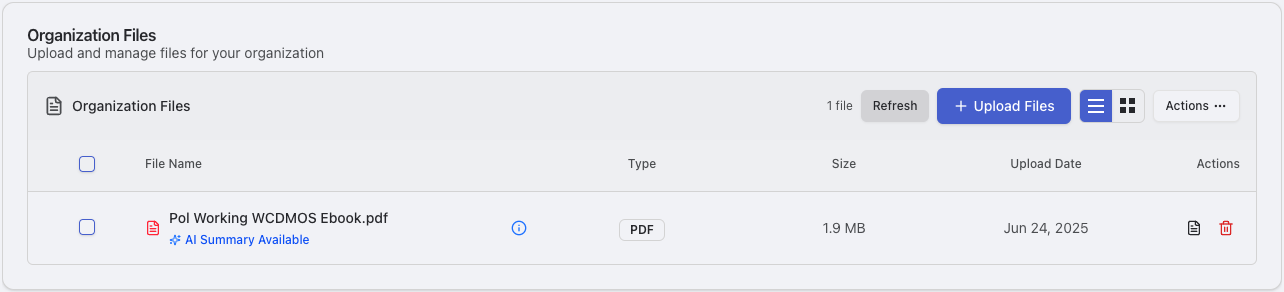 ## Accessing Organization Files
Click **"Personalization"** in the sidebar
Drag and drop files or use the upload button
* Single or bulk upload
* Automatic AI processing and analysis
Review AI-generated summaries and organize into folders
## Supported File Types
### Documents
* **PDF**: Documents with text extraction
* **Microsoft Word**: .docx files
* **Images**: JPEG/JPG files
* **Data Files**: CSV and JSON formats
### AI Processing Features
* **Summaries**: AI creates executive summaries
* **Topic Extraction**: Find main topics and concepts
* **Auto-Categorization**: Automatically sort by content type
* **Search**: Full-text search capabilities
* **Metadata**: Extract file properties and information
## Organization & Management
### Categories
* **Research Documents**: Papers, studies, technical documentation
* **Company Information**: Pitch decks, financial reports, roadmaps
* **Templates**: Document and email templates, SOPs
* **Reference Materials**: Industry reports, guidelines, training materials
### File Operations
* **Upload**: Drag and drop or click to upload files
* **View**: Click files to view and process them
* **Delete**: Remove files when no longer needed
* **Organize**: Keep files organized in your workspace
## Collaboration & Sharing
### Team Access
* Files uploaded to your team workspace are available to team members
* Access is controlled through your team's organization settings
* Files are processed by AI to extract insights and information
## AI Integration
### Knowledge Base Benefits
* Files help AI understand your business context
* Reference documents make AI responses more accurate
* AI can find connections between multiple documents
## Accessing Organization Files
Click **"Personalization"** in the sidebar
Drag and drop files or use the upload button
* Single or bulk upload
* Automatic AI processing and analysis
Review AI-generated summaries and organize into folders
## Supported File Types
### Documents
* **PDF**: Documents with text extraction
* **Microsoft Word**: .docx files
* **Images**: JPEG/JPG files
* **Data Files**: CSV and JSON formats
### AI Processing Features
* **Summaries**: AI creates executive summaries
* **Topic Extraction**: Find main topics and concepts
* **Auto-Categorization**: Automatically sort by content type
* **Search**: Full-text search capabilities
* **Metadata**: Extract file properties and information
## Organization & Management
### Categories
* **Research Documents**: Papers, studies, technical documentation
* **Company Information**: Pitch decks, financial reports, roadmaps
* **Templates**: Document and email templates, SOPs
* **Reference Materials**: Industry reports, guidelines, training materials
### File Operations
* **Upload**: Drag and drop or click to upload files
* **View**: Click files to view and process them
* **Delete**: Remove files when no longer needed
* **Organize**: Keep files organized in your workspace
## Collaboration & Sharing
### Team Access
* Files uploaded to your team workspace are available to team members
* Access is controlled through your team's organization settings
* Files are processed by AI to extract insights and information
## AI Integration
### Knowledge Base Benefits
* Files help AI understand your business context
* Reference documents make AI responses more accurate
* AI can find connections between multiple documents