> ## Documentation Index
> Fetch the complete documentation index at: https://docs.raycaster.ai/llms.txt
> Use this file to discover all available pages before exploring further.
# Text Column Types
> Understanding the different text column options available in Raycaster
## Overview
Raycaster offers three distinct text-based column types to handle various textual data needs. Each type is optimized for different use cases:
1. **SINGLE\_LINE\_TEXT**: Limited to one line with a 200 character maximum, perfect for titles, names, and identifiers
2. **MULTI\_LINE\_TEXT**: Plain text that can span multiple lines, ideal for notes and descriptions without formatting needs
3. **TEXT**: Rich text with advanced formatting capabilities, best for detailed content requiring structure and emphasis
## Column Display
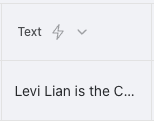
### Cell View
Text columns in cell view display content with appropriate formatting based on the text type:
 ### Sidebar View
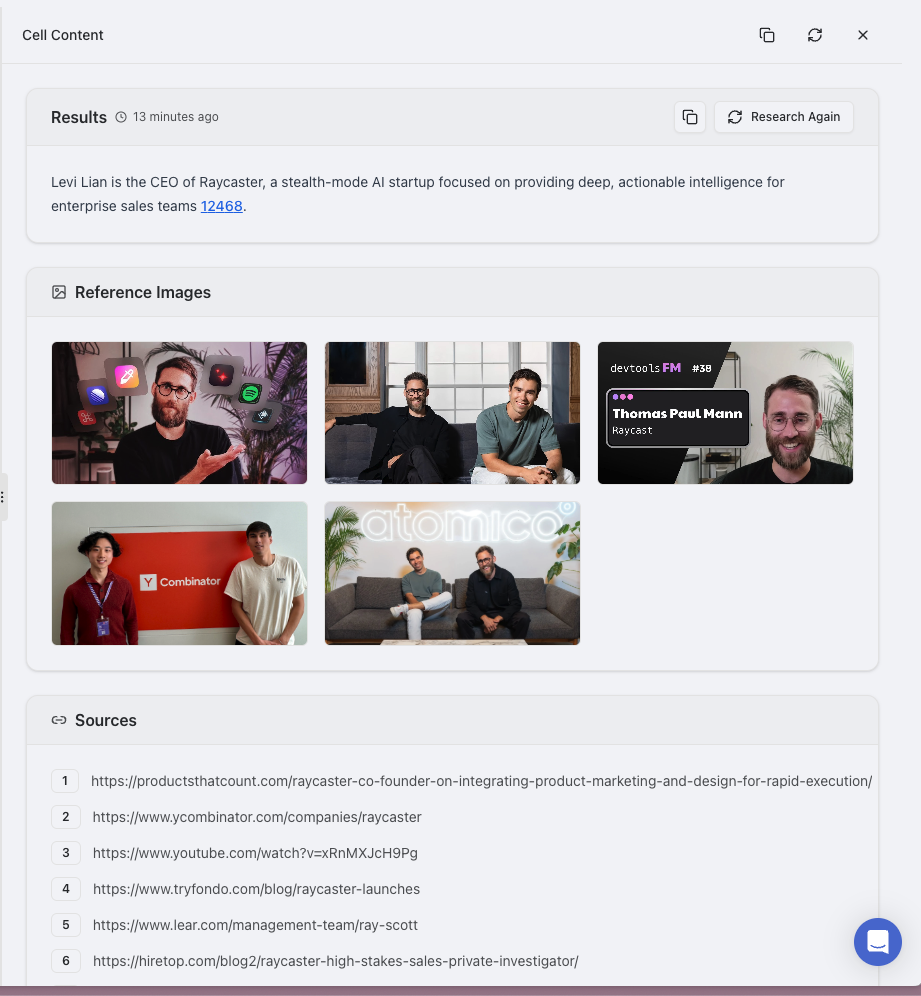
When clicked, the sidebar provides a full text editor with appropriate tools:
### Sidebar View
When clicked, the sidebar provides a full text editor with appropriate tools:
 ## When to Use Each Text Type
Use when you need compact, scannable information that fits in table views. Perfect for titles, names, and short identifiers.
Use when you need paragraph breaks but don't want the complexity of formatting options. Ideal for notes and descriptions.
Use when information benefits from visual hierarchy, emphasis, or structure. Best for detailed formatted content.
## Text Type Comparison
| Feature | SINGLE\_LINE\_TEXT | MULTI\_LINE\_TEXT | TEXT |
| ---------------------- | -------------------------------- | ------------------------------------- | ---------------------------------------- |
| **Character Limit** | 200 characters max | Unlimited | Unlimited |
| **Line Breaks** | Not supported | Supported | Supported |
| **Formatting** | Plain text only | Plain text only | Rich text (bold, italic, lists, etc.) |
| **Best For** | Titles, names, short identifiers | Notes, descriptions, plain narratives | Formatted content, detailed descriptions |
| **UI Display** | Single-line input | Multi-line textarea | Rich text editor with toolbar |
| **Table Display** | Full content visible | Truncated with expand option | Truncated with formatting preserved |
| **Sorting Behavior** | Alphabetical | Alphabetical by first line | Alphabetical by plain text version |
| **Export Behavior** | As is | Preserves line breaks | Converts to HTML or plain text |
| **Search Performance** | Fast | Medium | Complex (searches formatted text) |
## SINGLE\_LINE\_TEXT
### Use Cases
* Names and titles (e.g., 'Product Manager', 'Sales Director')
* Short identifiers (e.g., 'Q1-2025-Campaign', 'PROJ-123')
* Brief labels (e.g., 'High Priority', 'Needs Review')
* Page titles (e.g., 'Company Overview', 'Team Directory')
* SKU/ID values (e.g., 'SKU-12345', 'ID-ABC-789')
* Category names (e.g., 'Enterprise Software', 'Financial Services')
### Features
* **Compact**: Optimized for displaying in tables and lists without wasted space
* **Character Limit**: Maximum of 200 characters to ensure concise information
* **Validation**: Easily validate format and length with custom rules
* **UI Friendly**: Clean single-line input experience with character counter
* **Filtering Efficiency**: Optimized for exact-match and contains filtering
* **CSV/Excel Compatibility**: Exports cleanly without formatting issues
### Practical Examples
#### Company Names Column
```
Apple Inc.
Microsoft Corporation
Amazon Web Services
```
#### Project Status Column
```
In Progress
Completed
On Hold
```
### Configuration Tips
**Pro Tips for SINGLE\_LINE\_TEXT:**
* Add placeholder text to guide data entry (e.g., 'Enter full company name')
* Consider using default values for commonly repeated text
* For IDs or codes, consider a consistent format and document it for users
* When text might exceed 200 characters, use MULTI\_LINE\_TEXT instead
## MULTI\_LINE\_TEXT
### Use Cases
* Notes and comments (e.g., meeting notes, feedback responses)
* Simple descriptions (e.g., product summaries, job descriptions)
* Plain text narratives (e.g., issue descriptions, project summaries)
* Log entries (e.g., status updates, process logs)
* Unformatted instructions (e.g., step-by-step guides, procedures)
* Support ticket messages (e.g., problem reports, resolution notes)
* Code snippets or configuration blocks (when formatting isn't required)
### Features
* **Line Breaks**: Supports multiple paragraphs for better content organization
* **Plain Text**: No formatting to maintain simplicity and focus on content
* **Copy/Paste Friendly**: Preserves simple text structure when transferring content
* **Lightweight**: More efficient than rich text for basic needs
* **Unlimited Length**: No practical character limit for extensive content
* **Expand/Collapse**: Table views show a preview with option to expand
* **Whitespace Preservation**: Maintains indentation and spacing exactly as entered
* **Simplified Editing**: No toolbar or formatting distractions in the editor
### Practical Examples
#### Product Description
```
Enterprise Resource Planning (ERP) Software
A comprehensive business management solution that integrates:
- Financial management
- Supply chain operations
- Manufacturing processes
- Human resources
Designed for medium to large organizations seeking to streamline operations.
```
#### Meeting Notes
```
Quarterly Review - April 8, 2025
Attendees: Jane, Michael, Sarah, David
Key points discussed:
1. Q1 performance exceeded targets by 15%
2. New product launch delayed until August
3. Team expansion approved for Q3
Action items:
- Jane to revise marketing strategy
- Michael to prepare budget adjustments
- All to review the new roadmap by Friday
```
### Configuration Tips
**Best Practices for MULTI\_LINE\_TEXT:**
* Set an appropriate default height for the text area based on expected content length
* Consider adding placeholder text that demonstrates the multi-line capability
* For data that needs to be easily parsed later, consider using a consistent structure
* When importing data, ensure line breaks are preserved correctly
## TEXT (Rich Text)
### Use Cases
* Detailed product descriptions (e.g., comprehensive feature lists with formatting)
* Formatted documentation (e.g., user guides with headers, bold terms, and lists)
* Meeting notes with structure (e.g., agenda, discussion points, decisions, action items)
* Company overviews (e.g., mission statements, team structure, value propositions)
* Project briefs (e.g., objectives, timelines, requirements, stakeholders)
* Research findings (e.g., methodology, data analysis, conclusions)
* Policy documents (e.g., guidelines with hierarchical sections)
* Customer testimonials (with highlighted key quotes and proper attribution)
### Features
* **Rich Text Support**: Format with bold, italic, bullet points, headings, and more
* **Advanced Structure**: Create organized content with hierarchical elements
* **Unlimited Length**: No practical limit on the amount of text you can store
* **Search Optimized**: Full-text search capabilities that index all content
* **Media Integration**: Can include inline images and other media elements
* **Link Support**: Add hyperlinks to external resources or internal references
* **Table Creation**: Include structured data tables within your rich text
* **Styling Options**: Use consistent styles for a professional appearance
* **Export Formats**: Convert to HTML, PDF, or plain text when needed
#### Research Summary
**Market Analysis: SaaS Growth Trends 2025**
| Segment | Growth Rate | Key Drivers |
| ---------- | ----------- | ---------------------------------- |
| Enterprise | 23% | Digital transformation initiatives |
| SMB | 31% | Remote work adoption |
| Consumer | 18% | Subscription model preference |
Conclusion: The mid-market segment shows the highest potential for Q3 expansion.
### Configuration Tips
**Rich Text Optimization:**
* Enable only the formatting options your team needs to maintain consistency
* Use heading structures consistently for better organization and searchability
* Establish image size guidelines to maintain performance
## AI Research Capabilities
All text column types support AI analysis features that can extract insights from your textual data:
* **Sentiment Analysis**: Determine the emotional tone of text content
* **Key Phrase Extraction**: Automatically identify important topics and themes
* **Entity Recognition**: Detect and categorize named entities like organizations, people, and technologies
* **Topic Categorization**: Classify text into predefined categories or domains
* **Language Detection**: Identify the language used in text content
* **Content Summarization**: Generate concise summaries of text
* **Technical Term Identification**: Recognize specialized terminology
## Available Research Tools
Text column types support the following research tools:
* **STRUCTURED**: General-purpose research with formatted output
* **ADVANCED**: In-depth analysis with comprehensive data collection
* **EMAIL**: Email address discovery for TEXT and EMAIL columns
## Configuration Options
When creating or editing a text column, you can configure these options:
* **Column Type**: Choose between SINGLE\_LINE\_TEXT, MULTI\_LINE\_TEXT, or TEXT based on your needs
* **Formatting**: For TEXT columns, enable or disable specific formatting options
## Best Practices
* Use SINGLE\_LINE\_TEXT for brief identifiers and titles to maintain clean tables
* Choose MULTI\_LINE\_TEXT when you need line breaks but not formatting
* Reserve TEXT (rich text) for content that requires formatting for readability
* Use consistent text type choices across similar data categories
* Consider using SINGLE\_SELECT instead of free text for categorization
* Break very long content into multiple columns for better organization
* Match the column type to both your data and how users will interact with it
## When to Use Each Text Type
Use when you need compact, scannable information that fits in table views. Perfect for titles, names, and short identifiers.
Use when you need paragraph breaks but don't want the complexity of formatting options. Ideal for notes and descriptions.
Use when information benefits from visual hierarchy, emphasis, or structure. Best for detailed formatted content.
## Text Type Comparison
| Feature | SINGLE\_LINE\_TEXT | MULTI\_LINE\_TEXT | TEXT |
| ---------------------- | -------------------------------- | ------------------------------------- | ---------------------------------------- |
| **Character Limit** | 200 characters max | Unlimited | Unlimited |
| **Line Breaks** | Not supported | Supported | Supported |
| **Formatting** | Plain text only | Plain text only | Rich text (bold, italic, lists, etc.) |
| **Best For** | Titles, names, short identifiers | Notes, descriptions, plain narratives | Formatted content, detailed descriptions |
| **UI Display** | Single-line input | Multi-line textarea | Rich text editor with toolbar |
| **Table Display** | Full content visible | Truncated with expand option | Truncated with formatting preserved |
| **Sorting Behavior** | Alphabetical | Alphabetical by first line | Alphabetical by plain text version |
| **Export Behavior** | As is | Preserves line breaks | Converts to HTML or plain text |
| **Search Performance** | Fast | Medium | Complex (searches formatted text) |
## SINGLE\_LINE\_TEXT
### Use Cases
* Names and titles (e.g., 'Product Manager', 'Sales Director')
* Short identifiers (e.g., 'Q1-2025-Campaign', 'PROJ-123')
* Brief labels (e.g., 'High Priority', 'Needs Review')
* Page titles (e.g., 'Company Overview', 'Team Directory')
* SKU/ID values (e.g., 'SKU-12345', 'ID-ABC-789')
* Category names (e.g., 'Enterprise Software', 'Financial Services')
### Features
* **Compact**: Optimized for displaying in tables and lists without wasted space
* **Character Limit**: Maximum of 200 characters to ensure concise information
* **Validation**: Easily validate format and length with custom rules
* **UI Friendly**: Clean single-line input experience with character counter
* **Filtering Efficiency**: Optimized for exact-match and contains filtering
* **CSV/Excel Compatibility**: Exports cleanly without formatting issues
### Practical Examples
#### Company Names Column
```
Apple Inc.
Microsoft Corporation
Amazon Web Services
```
#### Project Status Column
```
In Progress
Completed
On Hold
```
### Configuration Tips
**Pro Tips for SINGLE\_LINE\_TEXT:**
* Add placeholder text to guide data entry (e.g., 'Enter full company name')
* Consider using default values for commonly repeated text
* For IDs or codes, consider a consistent format and document it for users
* When text might exceed 200 characters, use MULTI\_LINE\_TEXT instead
## MULTI\_LINE\_TEXT
### Use Cases
* Notes and comments (e.g., meeting notes, feedback responses)
* Simple descriptions (e.g., product summaries, job descriptions)
* Plain text narratives (e.g., issue descriptions, project summaries)
* Log entries (e.g., status updates, process logs)
* Unformatted instructions (e.g., step-by-step guides, procedures)
* Support ticket messages (e.g., problem reports, resolution notes)
* Code snippets or configuration blocks (when formatting isn't required)
### Features
* **Line Breaks**: Supports multiple paragraphs for better content organization
* **Plain Text**: No formatting to maintain simplicity and focus on content
* **Copy/Paste Friendly**: Preserves simple text structure when transferring content
* **Lightweight**: More efficient than rich text for basic needs
* **Unlimited Length**: No practical character limit for extensive content
* **Expand/Collapse**: Table views show a preview with option to expand
* **Whitespace Preservation**: Maintains indentation and spacing exactly as entered
* **Simplified Editing**: No toolbar or formatting distractions in the editor
### Practical Examples
#### Product Description
```
Enterprise Resource Planning (ERP) Software
A comprehensive business management solution that integrates:
- Financial management
- Supply chain operations
- Manufacturing processes
- Human resources
Designed for medium to large organizations seeking to streamline operations.
```
#### Meeting Notes
```
Quarterly Review - April 8, 2025
Attendees: Jane, Michael, Sarah, David
Key points discussed:
1. Q1 performance exceeded targets by 15%
2. New product launch delayed until August
3. Team expansion approved for Q3
Action items:
- Jane to revise marketing strategy
- Michael to prepare budget adjustments
- All to review the new roadmap by Friday
```
### Configuration Tips
**Best Practices for MULTI\_LINE\_TEXT:**
* Set an appropriate default height for the text area based on expected content length
* Consider adding placeholder text that demonstrates the multi-line capability
* For data that needs to be easily parsed later, consider using a consistent structure
* When importing data, ensure line breaks are preserved correctly
## TEXT (Rich Text)
### Use Cases
* Detailed product descriptions (e.g., comprehensive feature lists with formatting)
* Formatted documentation (e.g., user guides with headers, bold terms, and lists)
* Meeting notes with structure (e.g., agenda, discussion points, decisions, action items)
* Company overviews (e.g., mission statements, team structure, value propositions)
* Project briefs (e.g., objectives, timelines, requirements, stakeholders)
* Research findings (e.g., methodology, data analysis, conclusions)
* Policy documents (e.g., guidelines with hierarchical sections)
* Customer testimonials (with highlighted key quotes and proper attribution)
### Features
* **Rich Text Support**: Format with bold, italic, bullet points, headings, and more
* **Advanced Structure**: Create organized content with hierarchical elements
* **Unlimited Length**: No practical limit on the amount of text you can store
* **Search Optimized**: Full-text search capabilities that index all content
* **Media Integration**: Can include inline images and other media elements
* **Link Support**: Add hyperlinks to external resources or internal references
* **Table Creation**: Include structured data tables within your rich text
* **Styling Options**: Use consistent styles for a professional appearance
* **Export Formats**: Convert to HTML, PDF, or plain text when needed
#### Research Summary
**Market Analysis: SaaS Growth Trends 2025**
| Segment | Growth Rate | Key Drivers |
| ---------- | ----------- | ---------------------------------- |
| Enterprise | 23% | Digital transformation initiatives |
| SMB | 31% | Remote work adoption |
| Consumer | 18% | Subscription model preference |
Conclusion: The mid-market segment shows the highest potential for Q3 expansion.
### Configuration Tips
**Rich Text Optimization:**
* Enable only the formatting options your team needs to maintain consistency
* Use heading structures consistently for better organization and searchability
* Establish image size guidelines to maintain performance
## AI Research Capabilities
All text column types support AI analysis features that can extract insights from your textual data:
* **Sentiment Analysis**: Determine the emotional tone of text content
* **Key Phrase Extraction**: Automatically identify important topics and themes
* **Entity Recognition**: Detect and categorize named entities like organizations, people, and technologies
* **Topic Categorization**: Classify text into predefined categories or domains
* **Language Detection**: Identify the language used in text content
* **Content Summarization**: Generate concise summaries of text
* **Technical Term Identification**: Recognize specialized terminology
## Available Research Tools
Text column types support the following research tools:
* **STRUCTURED**: General-purpose research with formatted output
* **ADVANCED**: In-depth analysis with comprehensive data collection
* **EMAIL**: Email address discovery for TEXT and EMAIL columns
## Configuration Options
When creating or editing a text column, you can configure these options:
* **Column Type**: Choose between SINGLE\_LINE\_TEXT, MULTI\_LINE\_TEXT, or TEXT based on your needs
* **Formatting**: For TEXT columns, enable or disable specific formatting options
## Best Practices
* Use SINGLE\_LINE\_TEXT for brief identifiers and titles to maintain clean tables
* Choose MULTI\_LINE\_TEXT when you need line breaks but not formatting
* Reserve TEXT (rich text) for content that requires formatting for readability
* Use consistent text type choices across similar data categories
* Consider using SINGLE\_SELECT instead of free text for categorization
* Break very long content into multiple columns for better organization
* Match the column type to both your data and how users will interact with it