
> ## Documentation Index
> Fetch the complete documentation index at: https://docs.raycaster.ai/llms.txt
> Use this file to discover all available pages before exploring further.

# Publication Research

> Discover and analyze scientific literature related to your data with Raycaster's publication research capabilities

<div class="mt-4 bg-gradient-to-br from-[#4F5DFF10] to-[#7B85FF15] rounded-xl p-6 pb-8 border border-[#4F5DFF20]">
  <h1 class="text-2xl font-bold mb-2">Publication Research</h1>
  <p class="text-lg opacity-80 mb-4">Automatically discover, analyze, and connect scientific publications to your data for comprehensive research insights.</p>

  <div class="flex items-center gap-3 mb-4">
    <div class="bg-[#4F5DFF15] p-3 rounded-lg">
      <svg xmlns="http://www.w3.org/2000/svg" viewBox="0 0 24 24" fill="currentColor" class="w-6 h-6 text-[#4F5DFF]">
        <path d="M11.25 4.533A9.707 9.707 0 006 3a9.735 9.735 0 00-3.25.555.75.75 0 00-.5.707v14.25a.75.75 0 001 .707A8.237 8.237 0 016 18.75c1.995 0 3.823.707 5.25 1.886V4.533zM12.75 20.636A8.214 8.214 0 0118 18.75c.966 0 1.89.166 2.75.47a.75.75 0 001-.708V4.262a.75.75 0 00-.5-.707A9.735 9.735 0 0018 3a9.707 9.707 0 00-5.25 1.533v16.103z" />
      </svg>
    </div>

    <div>
      <h3 class="font-medium">Literature Discovery</h3>
      <p class="text-sm opacity-75">Find scientific publications related to specific research areas, compounds, or concepts</p>
    </div>
  </div>

  <div class="flex items-center gap-3 mb-4">
    <div class="bg-[#4F5DFF15] p-3 rounded-lg">
      <svg xmlns="http://www.w3.org/2000/svg" viewBox="0 0 24 24" fill="currentColor" class="w-6 h-6 text-[#4F5DFF]">
        <path fillRule="evenodd" d="M8.25 6.75a3.75 3.75 0 117.5 0 3.75 3.75 0 01-7.5 0zM15.75 9.75a3 3 0 116 0 3 3 0 01-6 0zM2.25 9.75a3 3 0 116 0 3 3 0 01-6 0zM6.31 15.117A6.745 6.745 0 0112 12a6.745 6.745 0 016.709 7.498.75.75 0 01-.372.568A12.696 12.696 0 0112 21.75c-2.305 0-4.47-.612-6.337-1.684a.75.75 0 01-.372-.568 6.787 6.787 0 011.019-4.38z" clipRule="evenodd" />

        <path d="M5.082 14.254a8.287 8.287 0 00-1.308 5.135 9.687 9.687 0 01-1.764-.44l-.115-.04a.563.563 0 01-.373-.487l-.01-.121a3.75 3.75 0 013.57-4.047zM20.226 19.389a8.287 8.287 0 00-1.308-5.135 3.75 3.75 0 013.57 4.047l-.01.121a.563.563 0 01-.373.486l-.115.04c-.567.2-1.156.349-1.764.441z" />
      </svg>
    </div>

    <div>
      <h3 class="font-medium">Author Analysis</h3>
      <p class="text-sm opacity-75">Identify key researchers and thought leaders in specific scientific domains</p>
    </div>
  </div>

  <div class="flex items-center gap-3">
    <div class="bg-[#4F5DFF15] p-3 rounded-lg">
      <svg xmlns="http://www.w3.org/2000/svg" viewBox="0 0 24 24" fill="currentColor" class="w-6 h-6 text-[#4F5DFF]">
        <path fillRule="evenodd" d="M2.25 2.25a.75.75 0 000 1.5H3v10.5a3 3 0 003 3h1.21l-1.172 3.513a.75.75 0 001.424.474l.329-.987h8.418l.33.987a.75.75 0 001.422-.474l-1.17-3.513H18a3 3 0 003-3V3.75h.75a.75.75 0 000-1.5H2.25zm6.54 15h6.42l.5 1.5H8.29l.5-1.5zm8.085-8.995a.75.75 0 10-.75-1.299 12.81 12.81 0 00-3.558 3.05L11.03 8.47a.75.75 0 00-1.06 0l-3 3a.75.75 0 101.06 1.06l2.47-2.47 1.617 1.618a.75.75 0 001.146-.102 11.312 11.312 0 013.612-3.321z" clipRule="evenodd" />
      </svg>
    </div>

    <div>
      <h3 class="font-medium">Research Trends</h3>
      <p class="text-sm opacity-75">Identify emerging research areas and track scientific developments over time</p>
    </div>
  </div>
</div>

## Understanding Publication Research

Raycaster's Publication Research capability enables you to automatically discover and analyze any literature relevant to your data. This feature searches through academic databases and extracts key information about scientific publications related to specific drugs, diseases, technologies, or scientific concepts.

### What Publication Research Can Do

Publication Research helps you:

1. **Discover relevant literature** related to specific data points in your tables
2. **Extract key publication information** including authors, journals, publication dates, and key findings
3. **Analyze research trends** to understand scientific developments and emerging areas
4. **Identify key researchers** and thought leaders in specific domains
5. **Connect your data** to the broader scientific landscape

### Supported Column Types

Utilize the Research column type to perform publication research

## How Publication Research Works

<div class="bg-gradient-to-r from-[#4F5DFF08] to-transparent p-1 rounded-xl mb-6">
  <div class="flex flex-col md:flex-row gap-4 p-3">
    <div class="flex-1 border border-[#4F5DFF20] bg-white dark:bg-gray-900 rounded-lg p-4 relative overflow-hidden">
      <div class="absolute top-0 left-0 w-full h-1 bg-[#4F5DFF]" />

      <div class="flex items-center mb-2">
        <div class="bg-[#4F5DFF] text-white w-6 h-6 rounded-full flex items-center justify-center mr-3 text-sm font-semibold">1</div>
        <h3 class="font-medium">Identify Source Data</h3>
      </div>

      <p class="text-sm pl-9">Identify what relevant publications from companies or people you are looking for</p>
    </div>

    <div class="flex-1 border border-[#4F5DFF20] bg-white dark:bg-gray-900 rounded-lg p-4 relative overflow-hidden">
      <div class="absolute top-0 left-0 w-full h-1 bg-[#4F5DFF]" />

      <div class="flex items-center mb-2">
        <div class="bg-[#4F5DFF] text-white w-6 h-6 rounded-full flex items-center justify-center mr-3 text-sm font-semibold">2</div>
        <h3 class="font-medium">Perform Publication Research</h3>
      </div>

      <p class="text-sm pl-9">Raycaster goes to work and finds the most relevant publications that are relevant to your needs.</p>
    </div>
  </div>

  <div class="flex flex-col md:flex-row gap-4 p-3">
    <div class="flex-1 border border-[#4F5DFF20] bg-white dark:bg-gray-900 rounded-lg p-4 relative overflow-hidden">
      <div class="absolute top-0 left-0 w-full h-1 bg-[#4F5DFF]" />

      <div class="flex items-center mb-2">
        <div class="bg-[#4F5DFF] text-white w-6 h-6 rounded-full flex items-center justify-center mr-3 text-sm font-semibold">3</div>
        <h3 class="font-medium">Analyze Publication Content</h3>
      </div>

      <p class="text-sm pl-9">The system extracts and analyzes key information from publications, including authors, summaries, journals, publication dates, methodology, findings, and significance.</p>
    </div>

    <div class="flex-1 border border-[#4F5DFF20] bg-white dark:bg-gray-900 rounded-lg p-4 relative overflow-hidden">
      <div class="absolute top-0 left-0 w-full h-1 bg-[#4F5DFF]" />

      <div class="flex items-center mb-2">
        <div class="bg-[#4F5DFF] text-white w-6 h-6 rounded-full flex items-center justify-center mr-3 text-sm font-semibold">4</div>
        <h3 class="font-medium">Present Structured Results</h3>
      </div>

      <p class="text-sm pl-9">Research results are formatted according to your column type with structured publication data, citations, and links to original papers.</p>
    </div>
  </div>
</div>

## Setting Up Publication Research

Follow these steps to set up and use Publication Research in your workspace:

<Steps>
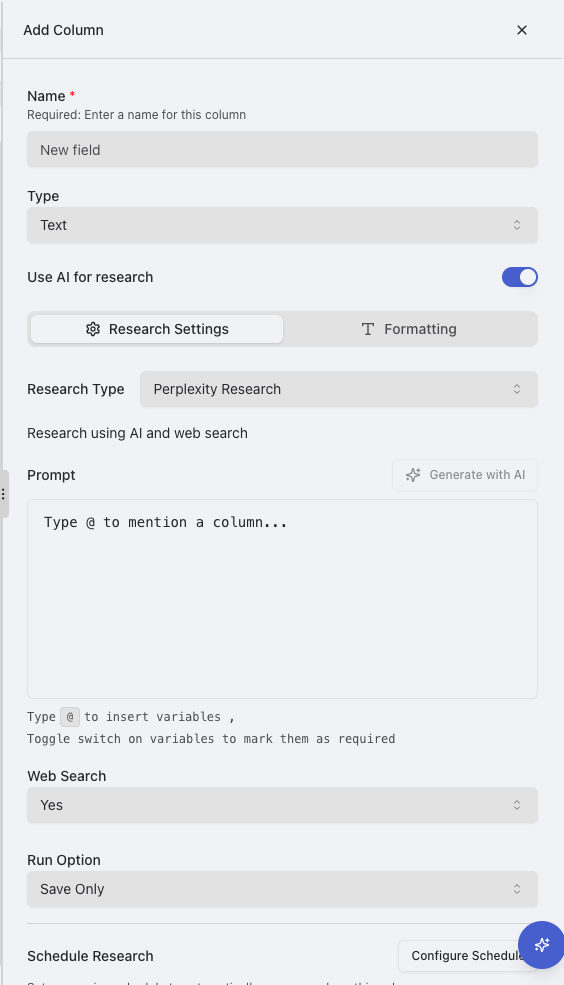
  <Step title="Create or Select a Column">
    Start by identifying which column contains the data you want to research (e.g., drug names, disease names, gene targets, or research concepts). Either use an existing column or create a new one.

    <img src="https://mintcdn.com/raycaster/NkwkAu8IAZ9zTAYr/images/add-column.png?fit=max&auto=format&n=NkwkAu8IAZ9zTAYr&q=85&s=038a15c5a54034836c729253134c52c6" alt="Select or Create Column" class="rounded-lg border border-gray-200 dark:border-gray-700 my-2" width="564" height="985" data-path="images/add-column.png" />
  </Step>

  <Step title="Create a Research Column">
    Create a new column where the publication research results will appear:

    1. Click the "+" button at the right end of your column headers
    2. Choose a name for your column (e.g., "Publication Information")
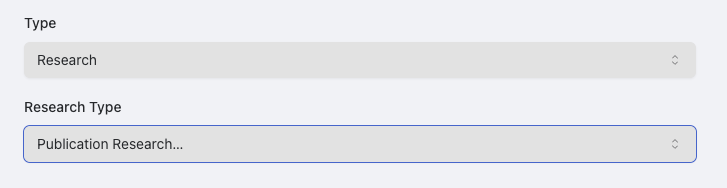
    3. Select the Research column type and select "Publication Research" as the research type.

    <img src="https://mintcdn.com/raycaster/7UelhNhIiWBOCuCS/images/publication-select.png?fit=max&auto=format&n=7UelhNhIiWBOCuCS&q=85&s=0b9b56c3ccfd1d8ad51d30f0787a051b" alt="Create Research Column" class="rounded-lg border border-gray-200 dark:border-gray-700 my-2" width="727" height="188" data-path="images/publication-select.png" />
  </Step>

  <Step title="Configure Research Settings">
    Configure the column for publication research:

    1. In the column editor, scroll to the "Research Configuration" section
    2. Modify or utilize the refault publication search query.
    3. From the "Research Type" dropdown, select "Publication Research"
    4. Edit or utilize the default highlights and summary query. These provide the prompt to what the outputted publication highlights/summary should emphasize.

           <Note>
             Helpful Tip: Utilizing the '@' character within the search query allows you to utilize variables from other columns. For example, names of companies or people.
           </Note>

           <img src="https://mintcdn.com/raycaster/7UelhNhIiWBOCuCS/images/publication-config.png?fit=max&auto=format&n=7UelhNhIiWBOCuCS&q=85&s=ebb37323a0d46a1bad1f590aab410bd3" alt="Configure Research Settings" class="rounded-lg border border-gray-200 dark:border-gray-700 my-2" width="738" height="589" data-path="images/publication-config.png" />
  </Step>

  <Step title="Save Your Configuration">
    Save your column configuration:

    1. Click "Save" to save your column settings
    2. Alternatively, select "Save & Run All" to immediately start research for all rows
  </Step>
</Steps>

## Running Publication Research

Once your column is configured, you can run publication research by clicking on the "Research" button within the cell.
You can also run patent research on a whole column with the "Save & Run All" option.

<img src="https://mintcdn.com/raycaster/7UelhNhIiWBOCuCS/images/run-research.png?fit=max&auto=format&n=7UelhNhIiWBOCuCS&q=85&s=119033f9bcb803e1bc8b5b15ae0235ba" alt="Publication Results" class="rounded-lg border border-gray-200 dark:border-gray-700 my-2 items-center" width="151" height="58" data-path="images/run-research.png" />

## Understanding Publication Research Results

Publication research results provide structured information about scientific literature related to your data:

### Types of Information Included

Depending on your research prompt and column configuration, publication research can provide:

* **Publication Metadata**: Titles, authors, journals, and publication dates
* **Content Summary**: Abstracts, key findings, and methodology overviews
* **Impact Metrics**: Citation counts, journal impact factors, and attention scores
* **Study Details**: Research designs, sample sizes, and outcome measures
* **Topical Classification**: Research areas, themes, and subject categorizations
* **Author Information**: Institutional affiliations and research histories
* **Links and Identifiers**: DOIs, PubMed IDs, and direct links to publications
* **Related Research**: Connected studies and research progression
* **Publication Context**: Scientific significance and relationship to broader research landscape

### Viewing Detailed Results

When you click on a cell containing publication research results, the side panel will open with comprehensive information:
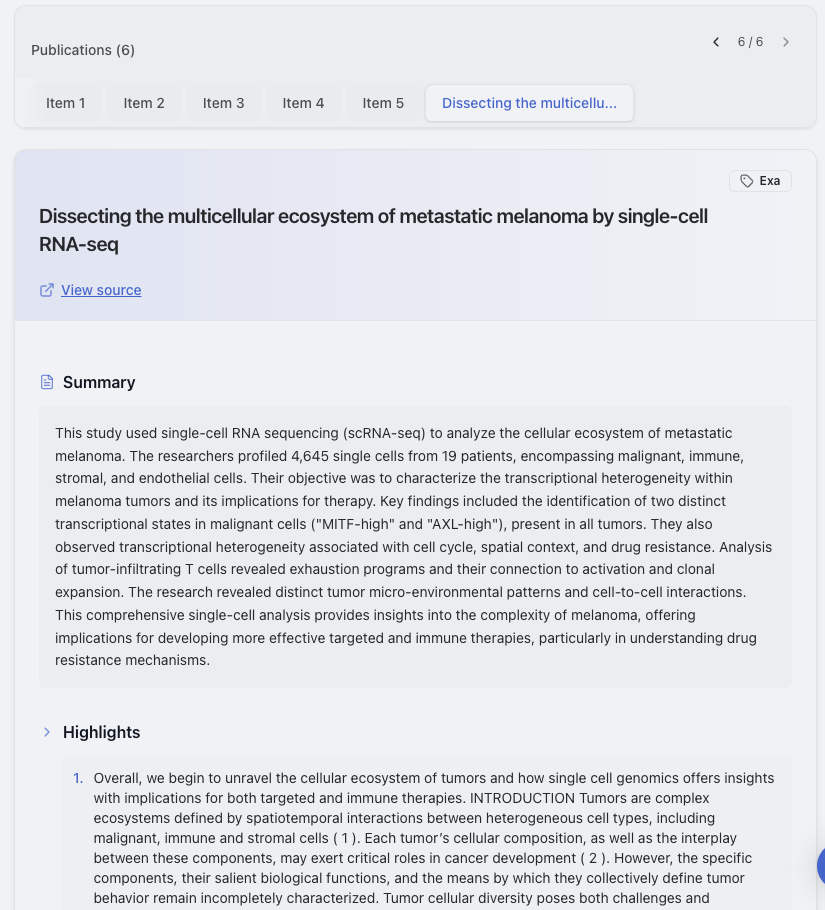
<h4 class="font-medium mb-2">Main Results View</h4>

<ul class="list-disc pl-5 text-sm space-y-1">
  <li>Summary of publications found</li>
  <li>List of most relevant publications</li>
  <li>Key information for each publication</li>
  <li>Links to original papers</li>
</ul>

<img src="https://mintcdn.com/raycaster/7UelhNhIiWBOCuCS/images/publication-view.png?fit=max&auto=format&n=7UelhNhIiWBOCuCS&q=85&s=8713391f024cb62dc5a4b0e676d07ac9" alt="Main Results View" class="rounded-lg border border-gray-200 dark:border-gray-700 mt-2" width="825" height="910" data-path="images/publication-view.png" />

## Publication Research Use Cases

<CardGroup cols={2}>
  <Card title="Literature Review" icon="book-open" color="#4F5DFF">
    <div class="text-sm">
      Quickly gather and summarize scientific literature on specific drugs, diseases, or therapeutic approaches for comprehensive research overviews.
    </div>
  </Card>

  <Card title="Evidence Validation" icon="check-double" color="#4F5DFF">
    <div class="text-sm">
      Find scientific evidence supporting specific mechanisms of action, efficacy claims, or safety profiles for drugs or treatments.
    </div>
  </Card>

  <Card title="Research Trend Analysis" icon="chart-line" color="#7B85FF">
    <div class="text-sm">
      Identify emerging research areas, track scientific interest over time, and pinpoint growing or declining focus in specific domains.
    </div>
  </Card>

  <Card title="Outbound Messages" icon="envelope" color="#7B85FF">
    <div class="text-sm">
      Provides the ability to send targeted outreach taliored to publications for outreach.
    </div>
  </Card>
</CardGroup>

## Optimizing Publication Research Results

Follow these best practices to get the most accurate and useful publication research results:

### Tips for Better Publication Research

1. **Be specific about publication types** - Clearly specify what types of publications you're interested in (e.g., clinical trials, review articles, basic research)

2. **Include relevant scientific terms** - Use precise scientific terminology that would appear in publications related to your area of interest

3. **Specify date ranges** - Indicate whether you want recent publications, historical publications, or a specific time period

4. **Mention key journals or databases** - Specify if you're particularly interested in publications from high-impact journals or specific databases

5. **Request specific metadata** - Clearly state what publication information is most important (authors, methodologies, findings, etc.)

6. **Use filtering criteria** - Include parameters to filter results (e.g., only human studies, only Phase III trials, only positive findings)

7. **Request specific organization** - Indicate how you want results organized (chronologically, by impact, by research type, etc.)

<Warning>
  Publication research works best when your source data is specific. Generic terms may return too many unrelated publications, while highly specific compound names or research areas will yield more relevant results.
</Warning>